Region#
This module contains the definition of a region as well as a boundary region along with template-regions for pre-defined combinations of elements and quadrature rules.
Core
|
A numeric region as a combination of a mesh, an element and a numeric integration scheme (quadrature rule). |
|
A numeric boundary-region as a combination of a mesh, an element and a numeric integration scheme (quadrature rule). |
Templates
|
A region with a quad element. |
|
A region with a hexahedron element. |
|
A region with a triangle element. |
|
A region with a tetra element. |
|
A region with a constant quad element. |
|
A region with a constant hexahedron element. |
|
A region with a (serendipity) quadratic quad element. |
|
A region with a (serendipity) quadratic hexahedron element. |
|
A region with a quadratic triangle element. |
|
A region with a quadratic tetra element. |
|
A region with a bi-quadratic (Lagrange) quad element. |
|
A region with a tri-quadratic (Lagrange) hexahedron element. |
|
A region with a triangle-MINI element. |
|
A region with a tetra-MINI element. |
|
A region with an arbitrary order Lagrange element. |
|
A region with a quad element. |
|
A boundary region with a hexahedron element. |
|
A region with a vertex element. |
|
A region with a truss element. |
Detailed API Reference
- class felupe.Region(mesh, element, quadrature, grad=True, hess=False, uniform=False)[ソース]#
A numeric region as a combination of a mesh, an element and a numeric integration scheme (quadrature rule).
- パラメータ:
mesh (Mesh) -- A mesh with points and cells.
element (Element) -- The finite element formulation to be applied on the cells.
quadrature (Quadrature) -- An element-compatible numeric integration scheme with points and weights.
grad (bool, optional) -- A flag to invoke gradient evaluation (default is True). If True, the partial derivatives of the element shape functions w.r.t. undeformed coordinates \(\frac{\partial \boldsymbol{h}}{\partial \boldsymbol{X}}\) and the differential volumes \(dV\) are evaluated.
hess (bool, optional) -- A flag to invoke hessian evaluation in addition to the gradient (default is False). If True, the second partial derivatives of the element shape functions w.r.t. undeformed coordinates \(\frac{\partial^2 \boldsymbol{h}}{\partial \boldsymbol{X}\ \partial \boldsymbol{X}}\) are evaluated.
uniform (bool, optional) -- A flag to activate a compressed storage of the element shape functions and their gradients for a uniform grid mesh. This is a performance feature. Default is False.
- element#
The finite element formulation to be applied on the cells.
- Type:
Finite element
- quadrature#
An element-compatible numeric integration scheme with points and weights.
- Type:
Quadrature scheme
- h#
Element shape function array
h_aqof shape functionaevaluated at quadrature pointq.- Type:
ndarray
- dhdr#
Partial derivative of element shape function array
dhdr_aJqwith shape functionaw.r.t. natural element coordinateJevaluated at quadrature pointqfor every cellc(geometric gradient or Jacobian transformation betweenXandr).- Type:
ndarray
- dXdr#
Geometric gradient
dXdr_IJqcas partial derivative of undeformed coordinateIw.r.t. natural element coordinateJevaluated at quadrature pointqfor every cellc(geometric gradient or Jacobian transformation betweenXandr).- Type:
ndarray
- drdX#
Inverse of dXdr.
- Type:
ndarray
- dV#
Numeric differential volume element as product of determinant of geometric gradient
dV_qc = det(dXdr)_qc w_qand quadrature weightw_q, evaluated at quadrature pointqfor every cellc.- Type:
ndarray
- dhdX#
Partial derivative of element shape functions
dhdX_aJqcof shape functionaw.r.t. undeformed coordinateJevaluated at quadrature pointqfor every cellc.- Type:
ndarray
メモ
The gradients of the element shape functions w.r.t the undeformed coordinates are evaluated at all integration points of each cell in the region if the optional gradient argument is
True.\[ \begin{align}\begin{aligned}\frac{\partial X_I}{\partial r_J} &= \hat{X}_{aI} \frac{ \partial h_a}{\partial r_J }\\\frac{\partial h_a}{\partial X_J} &= \frac{\partial h_a}{\partial r_I} \frac{\partial r_I}{\partial X_J}\\dV &= \det\left(\frac{\partial X_I}{\partial r_J}\right) w\end{aligned}\end{align} \]サンプル
>>> import felupe as fem
>>> mesh = fem.Rectangle(n=(3, 2))
>>> element = fem.Quad()
>>> quadrature = fem.GaussLegendre(order=1, dim=2)
>>> region = fem.Region(mesh, element, quadrature)
>>> region
<felupe Region object>
  Element formulation: Quad
  Quadrature rule: GaussLegendre
  Gradient evaluated: True
  Hessian evaluated: False
The numeric differential volumes are the products of the determinant of the geometric gradient \(\frac{\partial X_I}{\partial r_J}\) and the weights w of the quadrature points. The differential volume array is of shape
(nquadraturepoints, ncells).>>> region.dV array([[0.125, 0.125], [0.125, 0.125], [0.125, 0.125], [0.125, 0.125]])
Cell-volumes may be obtained by cell-wise sums of the differential volumes located at the quadrature points.
>>> region.dV.sum(axis=0)
array([0.5, 0.5])
The partial derivative of the first element shape function w.r.t. the undeformed coordinates evaluated at the second integration point of the last element of the region:
>>> region.dhdX[0, :, 1, -1]
array([-1.57735027, -0.21132487])
- astype(dtype, copy=True)[ソース]#
Copy the region and cast the arrays to a specified type.
- パラメータ:
dtype (str or dtype) -- Typecode or data-type to which the arrays of the region are cast.
copy (bool, optional) -- By default, astype always returns a copy of the region with newly allocated arrays. If False, the arrays of the input region are modified and the input region is returned. Default is True.
- 戻り値:
A copy of the region with arrays casted to a specified type.
- 戻り値の型:
参考
felupe.Region.copyReturn a copy of the region and reload it if necessary.
- copy(mesh=None, element=None, quadrature=None, grad=None, hess=None, uniform=None)[ソース]#
Return a copy of the region and reload it if necessary.
- パラメータ:
mesh (Mesh or None, optional) -- A mesh with points and cells (default is None).
element (Element or None, optional) -- The finite element formulation to be applied on the cells (default is None).
quadrature (Quadrature or None, optional) -- An element-compatible numeric integration scheme with points and weights (default is None).
grad (bool, optional) -- A flag to invoke gradient evaluation (default is True). If True, the partial derivatives of the element shape functions w.r.t. undeformed coordinates \(\frac{\partial \boldsymbol{h}}{\partial \boldsymbol{X}}\) and the differential volumes \(dV\) are evaluated.
hess (bool, optional) -- A flag to invoke hessian evaluation in addition to the gradient (default is False). If True, the second partial derivatives of the element shape functions w.r.t. undeformed coordinates \(\frac{\partial^2 \boldsymbol{h}}{\partial \boldsymbol{X}\ \partial \boldsymbol{X}}\) are evaluated.
uniform (bool or None, optional) -- A flag to activate a compressed storage of the element shape functions and their gradients for a uniform grid mesh. This is a performance feature. Default is None.
- 戻り値:
A copy of the reloaded region.
- 戻り値の型:
参考
felupe.Region.reloadReload the numeric region inplace.
- plot(**kwargs)[ソース]#
Plot the element with point-ids and the quadrature points, scaled by their weights.
- reload(mesh=None, element=None, quadrature=None, grad=None, hess=None, uniform=None)[ソース]#
Reload the numeric region inplace.
- パラメータ:
mesh (Mesh or None, optional) -- A mesh with points and cells (default is None).
element (Element or None, optional) -- The finite element formulation to be applied on the cells (default is None).
quadrature (Quadrature or None, optional) -- An element-compatible numeric integration scheme with points and weights (default is None).
grad (bool, optional) -- A flag to invoke gradient evaluation (default is True). If True, the partial derivatives of the element shape functions w.r.t. undeformed coordinates \(\frac{\partial \boldsymbol{h}}{\partial \boldsymbol{X}}\) and the differential volumes \(dV\) are evaluated.
hess (bool, optional) -- A flag to invoke hessian evaluation in addition to the gradient (default is False). If True, the second partial derivatives of the element shape functions w.r.t. undeformed coordinates \(\frac{\partial^2 \boldsymbol{h}}{\partial \boldsymbol{X}\ \partial \boldsymbol{X}}\) are evaluated.
uniform (bool or None, optional) -- A flag to activate a compressed storage of the element shape functions and their gradients for a uniform grid mesh. This is a performance feature. Default is None.
サンプル
警告
If the points of a mesh are modified and a region was already created with the mesh, it is important to re-evaluate (reload) the
Regioninplace.>>> import felupe as fem >>> >>> mesh = fem.Cube(n=6) >>> region = fem.RegionHexahedron(mesh) >>> field = fem.FieldContainer([fem.Field(region, dim=3)]) >>> >>> new_points = mesh.rotate(angle_deg=-90, axis=2).points >>> mesh.update(points=new_points, callback=region.reload)
参考
felupe.Mesh.updateUpdate the mesh with given points and cells arrays inplace. Optionally, a callback is evaluated.
- screenshot(filename=None, transparent_background=None, scale=None, **kwargs)[ソース]#
Take a screenshot of the element with the applied quadrature.
参考
pyvista.Plotter.screenshotTake a screenshot of a PyVista plotter.
- class felupe.RegionBoundary(mesh, element, quadrature, grad=True, only_surface=True, mask=None, ensure_3d=False)[ソース]#
A numeric boundary-region as a combination of a mesh, an element and a numeric integration scheme (quadrature rule).
- パラメータ:
mesh (Mesh) -- A mesh with points and cells.
element (Element) -- The finite element formulation to be applied on the cells.
quadrature (Quadrature) -- An element-compatible numeric integration scheme with points and weights.
grad (bool, optional) -- A flag to invoke gradient evaluation (default is True).
only_surface (bool, optional) -- A flag to use only the enclosing outline of the region (default is True).
mask (ndarray or None, optional) -- A boolean array to select a specific set of points (default is None).
ensure_3d (bool, optional) -- A flag to enforce 3d area normal vectors.
- element#
The finite element formulation to be applied on the cells.
- Type:
Finite element
- quadrature#
An element-compatible numeric integration scheme with points and weights.
- Type:
Quadrature scheme
- h#
Element shape function array
h_aqof shape functionaevaluated at quadrature pointq.- Type:
ndarray
- dhdr#
Partial derivative of element shape function array
dhdr_aJqwith shape functionaw.r.t. natural element coordinateJevaluated at quadrature pointqfor every cellc(geometric gradient or Jacobian transformation betweenXandr).- Type:
ndarray
- dXdr#
Geometric gradient
dXdr_IJqcas partial derivative of undeformed coordinateIw.r.t. natural element coordinateJevaluated at quadrature pointqfor every cellc(geometric gradient or Jacobian transformation betweenXandr).- Type:
ndarray
- drdX#
Inverse of dXdr.
- Type:
ndarray
- dA#
Numeric Differential area vectors.
- Type:
ndarray
- normals#
Area unit normal vectors.
- Type:
ndarray
- dV#
Numeric Differential volume element as norm of Differential area vectors.
- Type:
ndarray
- dhdX#
Partial derivative of element shape functions
dhdX_aJqcof shape functionaw.r.t. undeformed coordinateJevaluated at quadrature pointqfor every cellc.- Type:
ndarray
メモ
The gradients of the element shape functions w.r.t the undeformed coordinates are evaluated at all integration points of each cell in the region if the optional gradient argument is
True.\[ \begin{align}\begin{aligned}\frac{\partial X_I}{\partial r_J} &= \hat{X}_{aI} \frac{ \partial h_a}{\partial r_J }\\\frac{\partial h_a}{\partial X_J} &= \frac{\partial h_a}{\partial r_I} \frac{\partial r_I}{\partial X_J}\\dV &= \det\left(\frac{\partial X_I}{\partial r_J}\right) w\end{aligned}\end{align} \]サンプル
>>> import felupe as fem
>>>
>>> mesh = fem.Rectangle(n=(3, 2))
>>> element = fem.Quad()
>>> quadrature = fem.GaussLegendreBoundary(order=1, dim=2)
>>>
>>> region = fem.RegionBoundary(mesh, element, quadrature)
>>> region
<felupe Region object>
  Element formulation: Quad
  Quadrature rule: GaussLegendreBoundary
  Gradient evaluated: True
  Hessian evaluated: False
The numeric differential area vectors are the products of the cofactors of the geometric gradient \(\partial X_I / \partial r_J\) and the weights w of the quadrature points. The differential area vectors array is of shape
(nquadraturepoints, ndim, nboundarycells).>>> region.dA array([[[ 0. , -0.5 , 0. , 0.5 , 0. , 0. ], [ 0. , -0.5 , 0. , 0.5 , 0. , 0. ]], [[-0.25, -0. , -0.25, -0. , 0.25, 0.25], [-0.25, -0. , -0.25, -0. , 0.25, 0.25]]])
In a boundary region, the numeric differential volumes are the magnitudes of the differential area vectors. For a quad mesh, the boundary cell volumes are the edge lengths.
>>> region.dV.sum(axis=0)
array([0.5, 1. , 0.5, 1. , 0.5, 0.5])
Unit normal vectors are obtained by the ratio of the differential area vectors and the differential volumes.
>>> region.dA / region.dV  ## this is equal to ``region.normals``
array([[[ 0., -1.,  0.,  1.,  0.,  0.],
        [ 0., -1.,  0.,  1.,  0.,  0.]],

       [[-1., -0., -1., -0.,  1.,  1.],
        [-1., -0., -1., -0.,  1.,  1.]]])
The partial derivative of the first element shape function w.r.t. the undeformed coordinates, evaluated at the second integration point of the last element of the region, is obtained by:
>>> region.dhdX[0, :, 1, -1]
array([2.        , 0.21132487])
The faces-cells may be used to create a mesh on the boundary.
>>> fem.Mesh(points=mesh.points, cells=region.mesh.cells_faces, cell_type="line")
<felupe Mesh object>
  Number of points: 6
  Number of cells:
    line: 6
A second example shows the standard unit vectors and the area normals, located at the quadrature points for all edges of a quadrilateral.
>>> import felupe as fem
>>> import numpy as np
>>> import pyvista as pv
>>>
>>> m = fem.Rectangle(n=2)
>>> mesh = m.copy()
>>> mesh.points[-1, 0] += 0.5
>>> edges = fem.RegionQuadBoundary(mesh)
>>>
>>> start = fem.Field(edges, values=mesh.points).interpolate()
>>> (direction,) = edges.tangents
>>>
>>> # 3d-data required for plotting
>>> start = np.insert(start, len(start), 0, axis=0)
>>> direction = np.insert(direction, len(direction), 0, axis=0)
>>> normal = np.insert(edges.normals, len(edges.normals), 0, axis=0)
>>>
>>> plotter = pv.Plotter()
... actor = plotter.add_arrows(
...     start.reshape(3, -1).T,
...     direction.reshape(3, -1).T,
...     show_scalar_bar=False,
...     mag=1 / 7,
...     color="red",
...     label="tangents",
... )
>>> actor = plotter.add_arrows(
...     start.reshape(3, -1).T,
...     normal.reshape(3, -1).T,
...     show_scalar_bar=False,
...     mag=1 / 7,
...     color="green",
...     label="normals",
... )
>>> actor = plotter.add_legend()
>>> mesh.plot(plotter=plotter, style="wireframe").show()
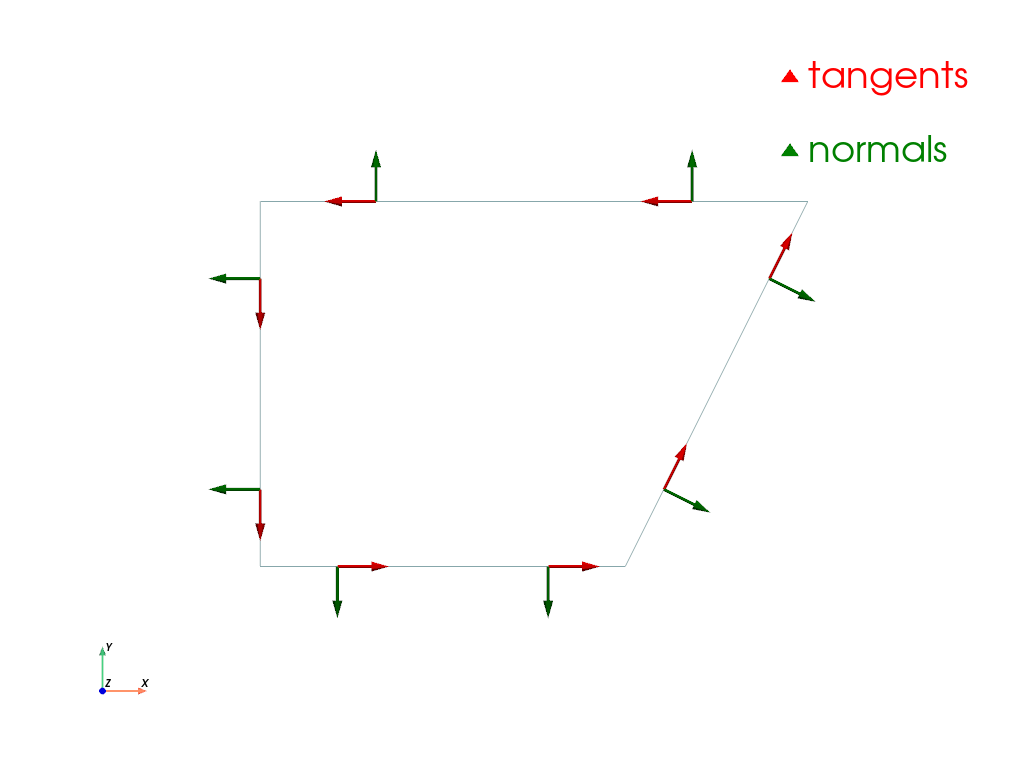
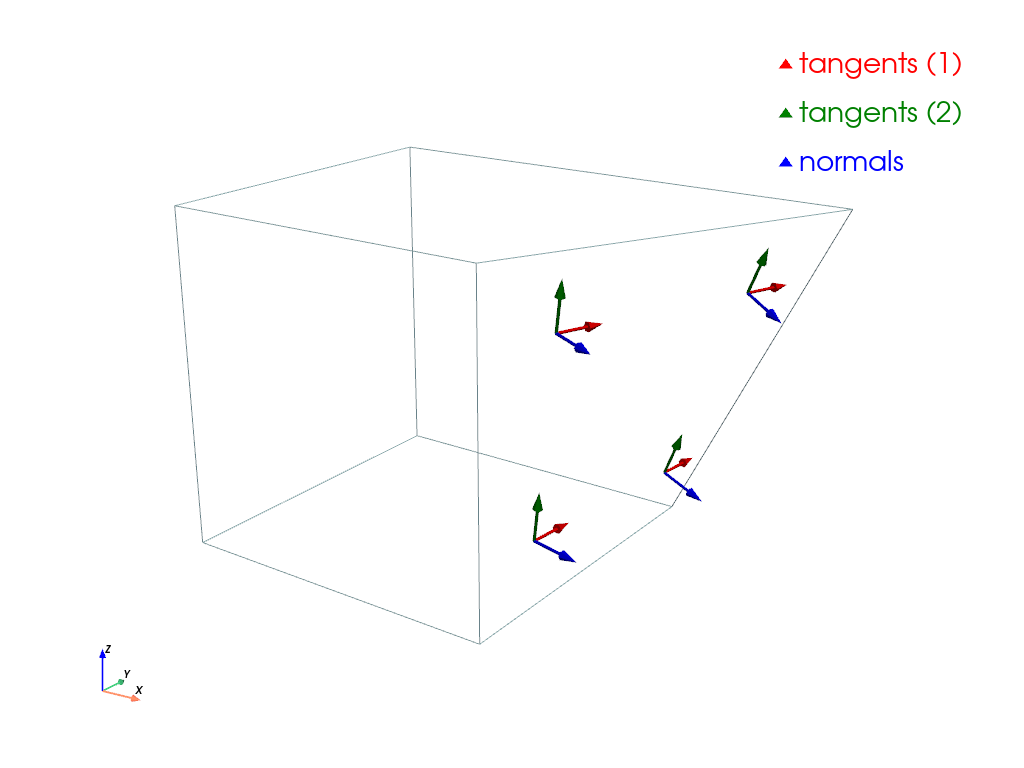
A third example shows the standard unit vectors and the area normals, located at the quadrature points for one face of a hexahedron.
>>> import felupe as fem
>>> import numpy as np
>>> import pyvista as pv
>>>
>>> m = fem.Cube(n=2)
>>> mesh = m.copy()
>>> mesh.points[-1, 0] += 0.5
>>> faces = fem.RegionHexahedronBoundary(mesh, mask=m.x == m.x.max())
>>>
>>> start = fem.Field(faces, values=mesh.points).interpolate()
>>> direction, direction_2 = faces.tangents
>>>
>>> plotter = pv.Plotter()
>>> actor = plotter.add_arrows(
...     start.reshape(3, -1).T,
...     direction.reshape(3, -1).T,
...     show_scalar_bar=False,
...     mag=1 / 7,
...     color="red",
...     label="tangents (1)",
... )
>>> actor = plotter.add_arrows(
...     start.reshape(3, -1).T,
...     direction_2.reshape(3, -1).T,
...     show_scalar_bar=False,
...     mag=1 / 7,
...     color="green",
...     label="tangents (2)",
... )
>>> actor = plotter.add_arrows(
...     start.reshape(3, -1).T,
...     faces.normals.reshape(3, -1).T,
...     show_scalar_bar=False,
...     mag=1 / 7,
...     color="blue",
...     label="normals",
... )
>>> plotter.add_legend()
>>> mesh.plot(plotter=plotter, style="wireframe").show()
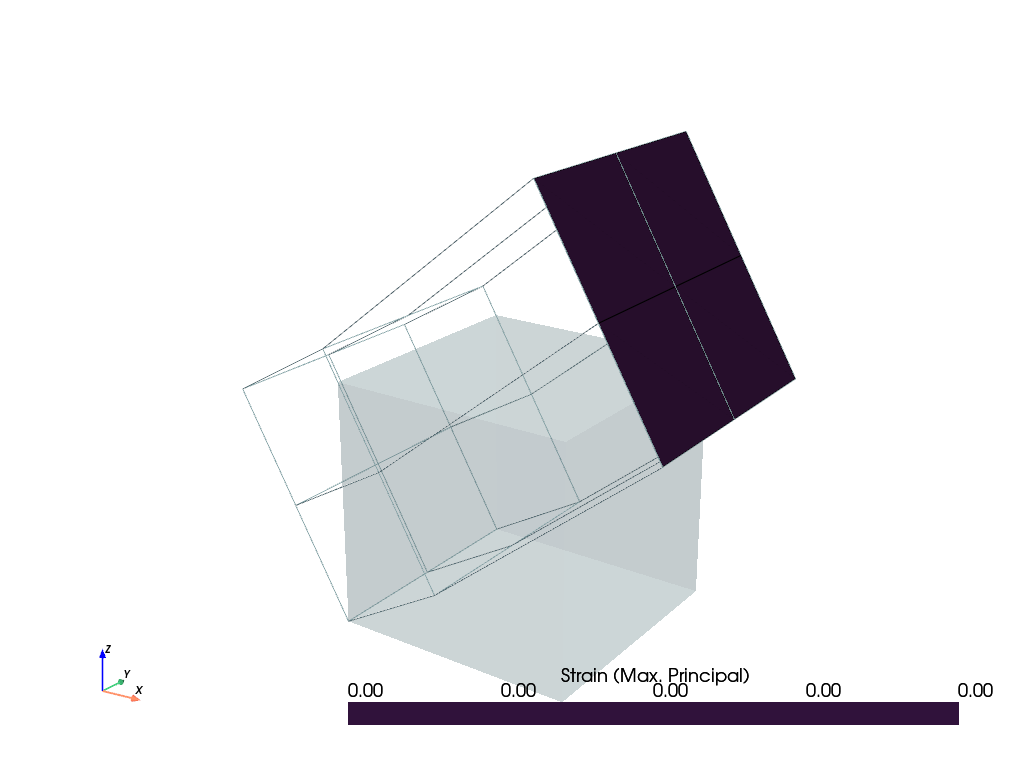
This examples shows how to evaluate the strain on the faces of the boundary region. A field can't be used to evaluate the strain of a quad-cell in 3D space. However, it is possible to evaluate the in-plane components of the right Cauchy-Green deformation tensor on the boundary. With this tensor at hand, it is possible to evaluate any in-plane strain tensor.
>>> import felupe as fem
>>>
>>> mesh = fem.Cube(n=3)
>>> region = fem.RegionHexahedron(mesh)
>>> field = fem.FieldContainer([fem.Field(region, dim=3)])
>>>
>>> field[0].values[mesh.x == 1, 0] += 0.5
>>> field[0].values[mesh.x == 1, 2] += 0.5
>>> field[0].values += mesh.rotate(-30, axis=1).points - mesh.points
>>>
>>> face = fem.RegionHexahedronBoundary(mesh, mask=mesh.x == mesh.x.max())
>>> u = fem.FieldContainer([fem.Field(face, dim=3)])
>>> u.link(field)
>>>
>>> mesh_faces = face.mesh_faces()
>>> mesh_faces.points += field[0].values
>>>
>>> C = fem.math.inplane(u.evaluate.right_cauchy_green_deformation(), face.tangents)
>>> e = fem.math.strain(u, C=C, k=0)
>>>
>>> view = mesh_faces.view(
...     cell_data={"ep": fem.math.eigvalsh(e).max(axis=0).mean(axis=-2).T}
... )
>>> view.plot("ep", label="Strain (Max. Principal)", plotter=field.plot(style="wireframe")).show()
- astype(dtype, copy=True)#
Copy the region and cast the arrays to a specified type.
- パラメータ:
dtype (str or dtype) -- Typecode or data-type to which the arrays of the region are cast.
copy (bool, optional) -- By default, astype always returns a copy of the region with newly allocated arrays. If False, the arrays of the input region are modified and the input region is returned. Default is True.
- 戻り値:
A copy of the region with arrays casted to a specified type.
- 戻り値の型:
参考
felupe.Region.copyReturn a copy of the region and reload it if necessary.
- copy(mesh=None, element=None, quadrature=None, grad=None, hess=None, uniform=None)#
Return a copy of the region and reload it if necessary.
- パラメータ:
mesh (Mesh or None, optional) -- A mesh with points and cells (default is None).
element (Element or None, optional) -- The finite element formulation to be applied on the cells (default is None).
quadrature (Quadrature or None, optional) -- An element-compatible numeric integration scheme with points and weights (default is None).
grad (bool, optional) -- A flag to invoke gradient evaluation (default is True). If True, the partial derivatives of the element shape functions w.r.t. undeformed coordinates \(\frac{\partial \boldsymbol{h}}{\partial \boldsymbol{X}}\) and the differential volumes \(dV\) are evaluated.
hess (bool, optional) -- A flag to invoke hessian evaluation in addition to the gradient (default is False). If True, the second partial derivatives of the element shape functions w.r.t. undeformed coordinates \(\frac{\partial^2 \boldsymbol{h}}{\partial \boldsymbol{X}\ \partial \boldsymbol{X}}\) are evaluated.
uniform (bool or None, optional) -- A flag to activate a compressed storage of the element shape functions and their gradients for a uniform grid mesh. This is a performance feature. Default is None.
- 戻り値:
A copy of the reloaded region.
- 戻り値の型:
参考
felupe.Region.reloadReload the numeric region inplace.
- plot(**kwargs)#
Plot the element with point-ids and the quadrature points, scaled by their weights.
- reload(mesh=None, element=None, quadrature=None, grad=None, hess=None, uniform=None)#
Reload the numeric region inplace.
- パラメータ:
mesh (Mesh or None, optional) -- A mesh with points and cells (default is None).
element (Element or None, optional) -- The finite element formulation to be applied on the cells (default is None).
quadrature (Quadrature or None, optional) -- An element-compatible numeric integration scheme with points and weights (default is None).
grad (bool, optional) -- A flag to invoke gradient evaluation (default is True). If True, the partial derivatives of the element shape functions w.r.t. undeformed coordinates \(\frac{\partial \boldsymbol{h}}{\partial \boldsymbol{X}}\) and the differential volumes \(dV\) are evaluated.
hess (bool, optional) -- A flag to invoke hessian evaluation in addition to the gradient (default is False). If True, the second partial derivatives of the element shape functions w.r.t. undeformed coordinates \(\frac{\partial^2 \boldsymbol{h}}{\partial \boldsymbol{X}\ \partial \boldsymbol{X}}\) are evaluated.
uniform (bool or None, optional) -- A flag to activate a compressed storage of the element shape functions and their gradients for a uniform grid mesh. This is a performance feature. Default is None.
サンプル
警告
If the points of a mesh are modified and a region was already created with the mesh, it is important to re-evaluate (reload) the
Regioninplace.>>> import felupe as fem >>> >>> mesh = fem.Cube(n=6) >>> region = fem.RegionHexahedron(mesh) >>> field = fem.FieldContainer([fem.Field(region, dim=3)]) >>> >>> new_points = mesh.rotate(angle_deg=-90, axis=2).points >>> mesh.update(points=new_points, callback=region.reload)
参考
felupe.Mesh.updateUpdate the mesh with given points and cells arrays inplace. Optionally, a callback is evaluated.
- screenshot(filename=None, transparent_background=None, scale=None, **kwargs)#
Take a screenshot of the element with the applied quadrature.
参考
pyvista.Plotter.screenshotTake a screenshot of a PyVista plotter.
- class felupe.RegionQuad(mesh, quadrature=<felupe.quadrature._gauss_legendre.GaussLegendre object>, grad=True, **kwargs)[ソース]#
ベースクラス:
RegionA region with a quad element.
サンプル
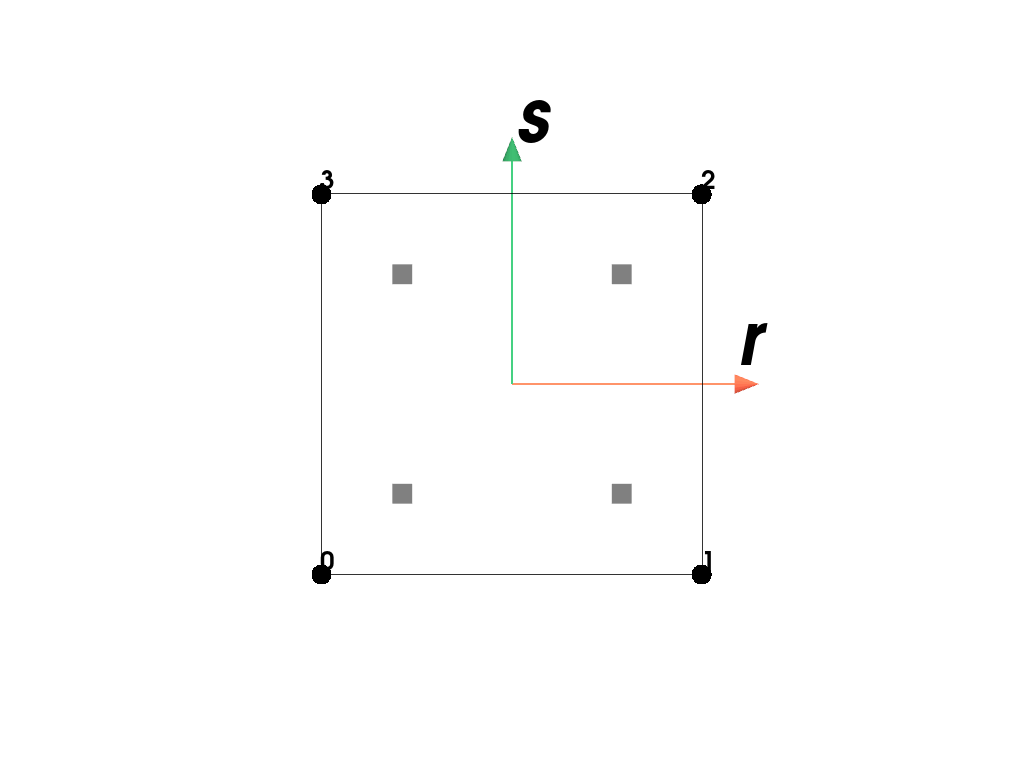
Plot the element with its point-ids and the applied quadrature rule.
>>> import felupe as fem
>>>
>>> mesh = fem.Rectangle()
>>> region = fem.RegionQuad(mesh)
>>> region
<felupe Region object>
  Element formulation: Quad
  Quadrature rule: GaussLegendre
  Gradient evaluated: True
  Hessian evaluated: False
>>> region.plot().show()
- class felupe.RegionQuadBoundary(mesh, quadrature=<felupe.quadrature._gauss_legendre.GaussLegendreBoundary object>, grad=True, only_surface=True, mask=None, ensure_3d=False, **kwargs)[ソース]#
ベースクラス:
RegionBoundaryA region with a quad element.
サンプル
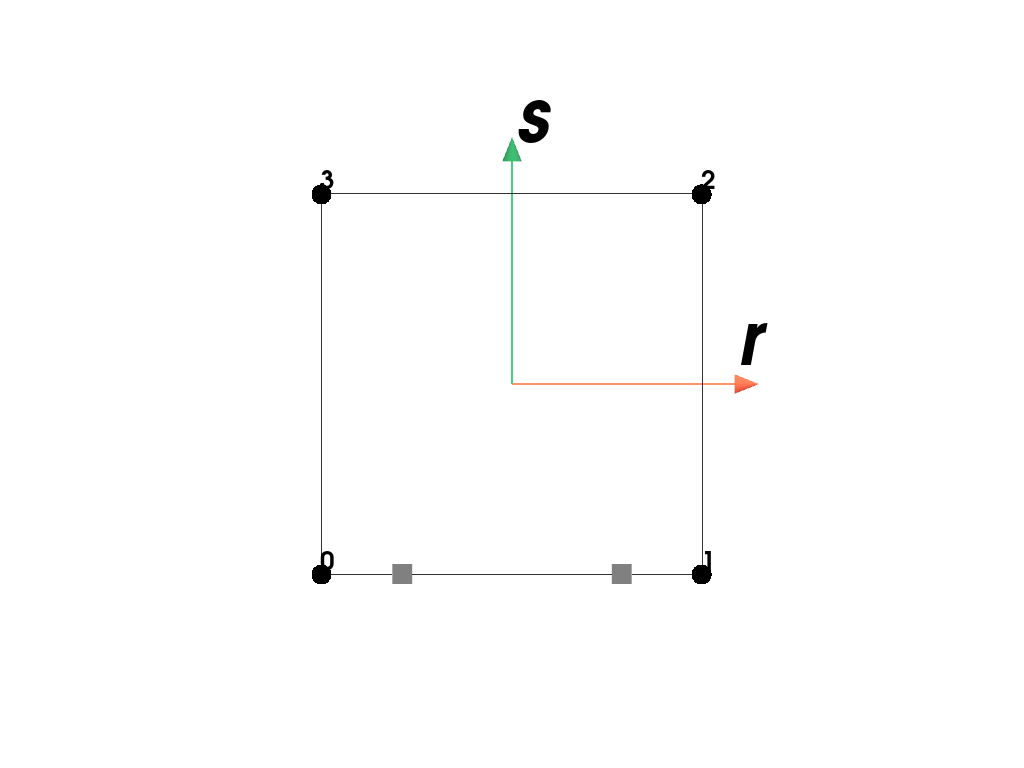
Plot the element with its point-ids and the applied quadrature rule.
>>> import felupe as fem
>>>
>>> mesh = fem.Rectangle()
>>> region = fem.RegionQuadBoundary(mesh)
>>> region
<felupe Region object>
  Element formulation: Quad
  Quadrature rule: GaussLegendreBoundary
  Gradient evaluated: True
  Hessian evaluated: False
>>> region.plot().show()
参考
felupe.RegionBoundaryA numeric boundary-region as a combination of a mesh, an element and a numeric integration scheme (quadrature rule).
- class felupe.RegionHexahedronBoundary(mesh, quadrature=<felupe.quadrature._gauss_legendre.GaussLegendreBoundary object>, grad=True, only_surface=True, mask=None, **kwargs)[ソース]#
ベースクラス:
RegionBoundaryA boundary region with a hexahedron element.
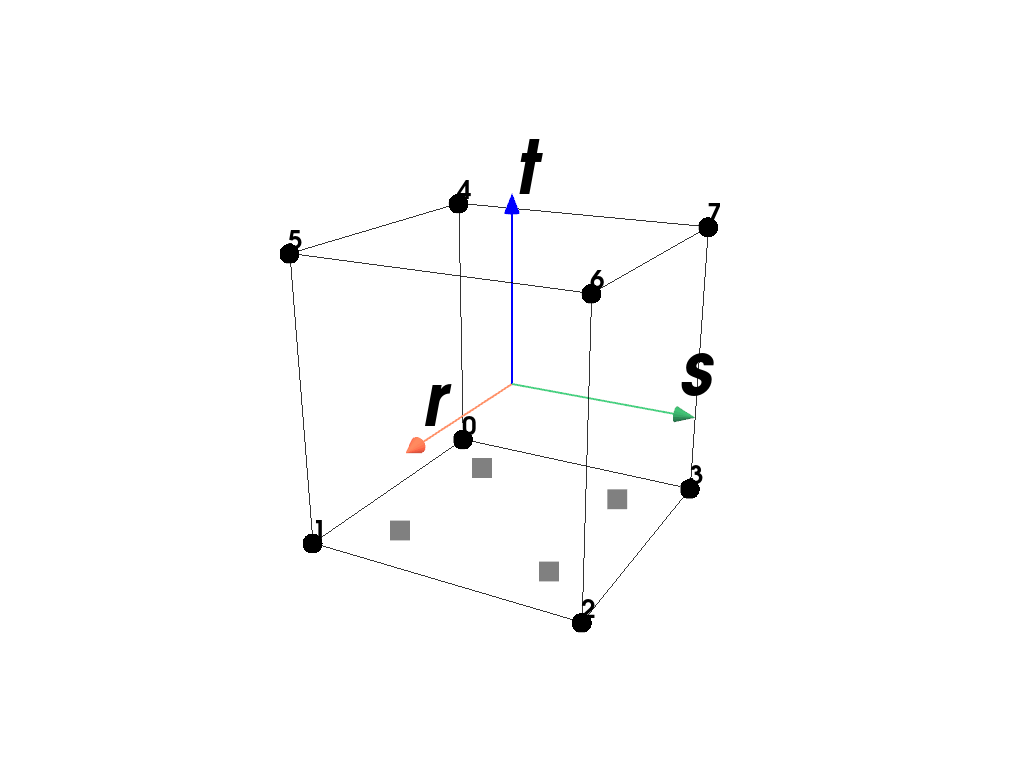
サンプル
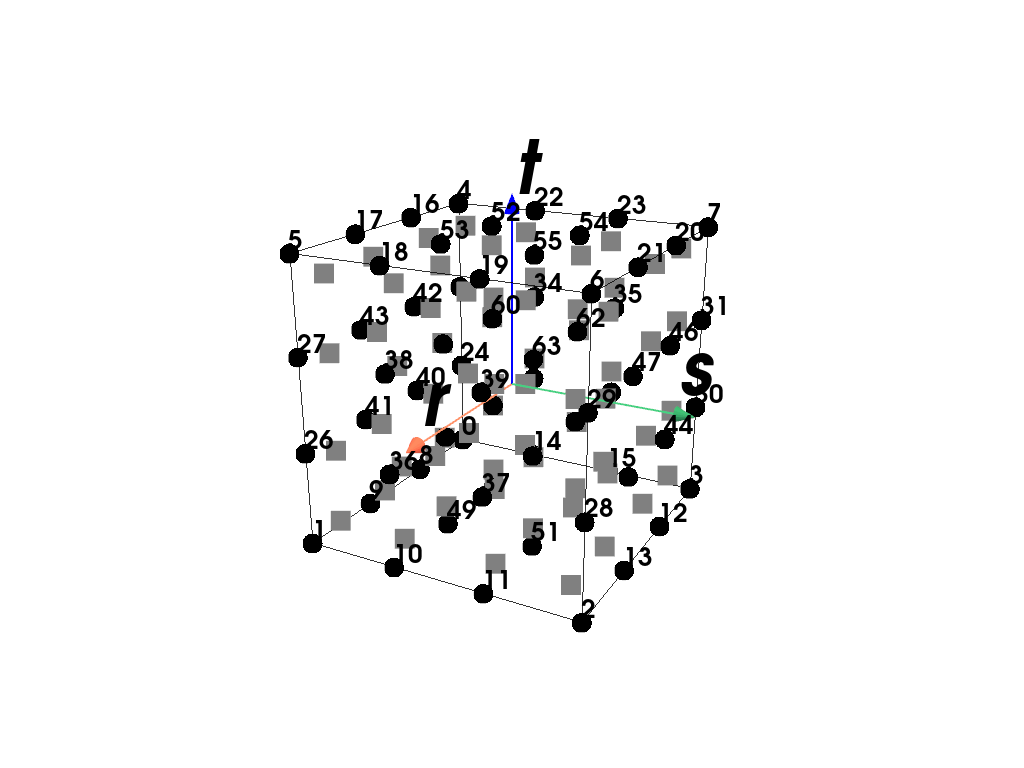
Plot the element with its point-ids and the applied quadrature rule.
>>> region.plot().show()
参考
felupe.RegionBoundaryA numeric boundary-region as a combination of a mesh, an element and a numeric integration scheme (quadrature rule).
- class felupe.RegionHexahedron(mesh, quadrature=<felupe.quadrature._gauss_legendre.GaussLegendre object>, grad=True, **kwargs)[ソース]#
ベースクラス:
RegionA region with a hexahedron element.
サンプル
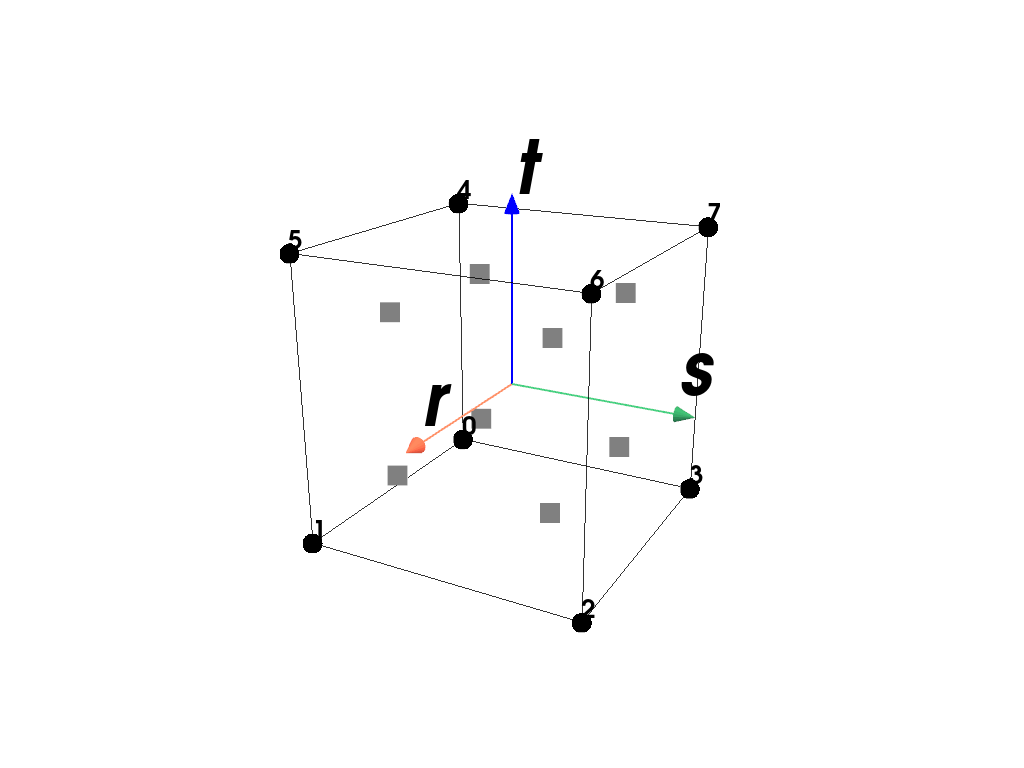
Plot the element with its point-ids and the applied quadrature rule.
>>> region.plot().show()
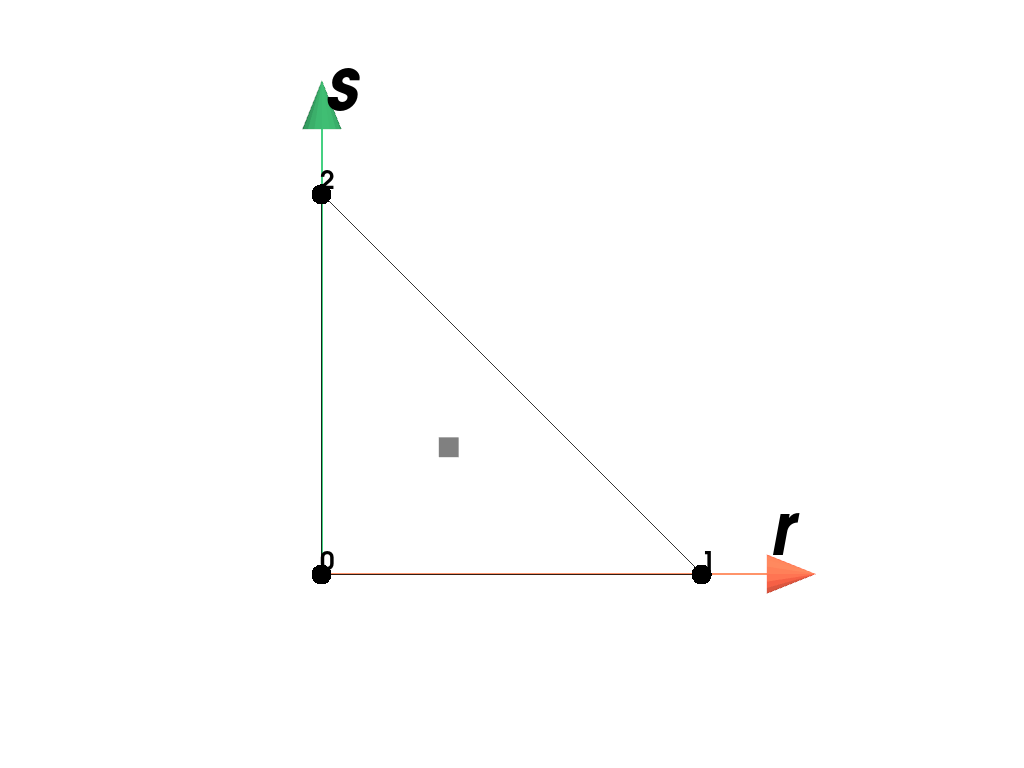
- class felupe.RegionTriangle(mesh, quadrature=<felupe.quadrature._triangle.Triangle object>, grad=True, **kwargs)[ソース]#
ベースクラス:
RegionA region with a triangle element.
サンプル
Plot the element with its point-ids and the applied quadrature rule.
>>> import felupe as fem
>>>
>>> mesh = fem.mesh.Rectangle().triangulate()
>>> region = fem.RegionTriangle(mesh)
>>> region
<felupe Region object>
  Element formulation: Triangle
  Quadrature rule: Triangle
  Gradient evaluated: True
  Hessian evaluated: False
>>> region.plot().show()
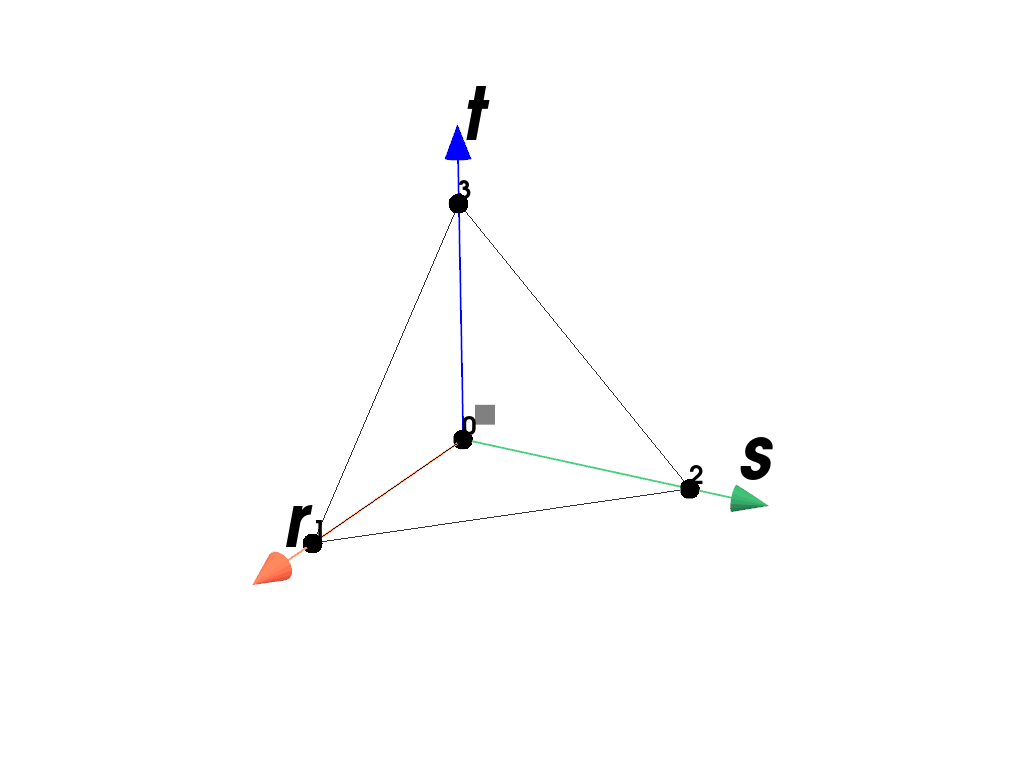
- class felupe.RegionTetra(mesh, quadrature=<felupe.quadrature._tetra.Tetrahedron object>, grad=True, **kwargs)[ソース]#
ベースクラス:
RegionA region with a tetra element.
サンプル
Plot the element with its point-ids and the applied quadrature rule.
>>> import felupe as fem
>>>
>>> mesh = fem.Cube().triangulate()
>>> region = fem.RegionTetra(mesh)
>>> region
<felupe Region object>
  Element formulation: Tetra
  Quadrature rule: Tetrahedron
  Gradient evaluated: True
  Hessian evaluated: False
>>> region.plot().show()
- class felupe.RegionConstantQuad(mesh, quadrature=<felupe.quadrature._gauss_legendre.GaussLegendre object>, grad=False, **kwargs)[ソース]#
ベースクラス:
RegionA region with a constant quad element.
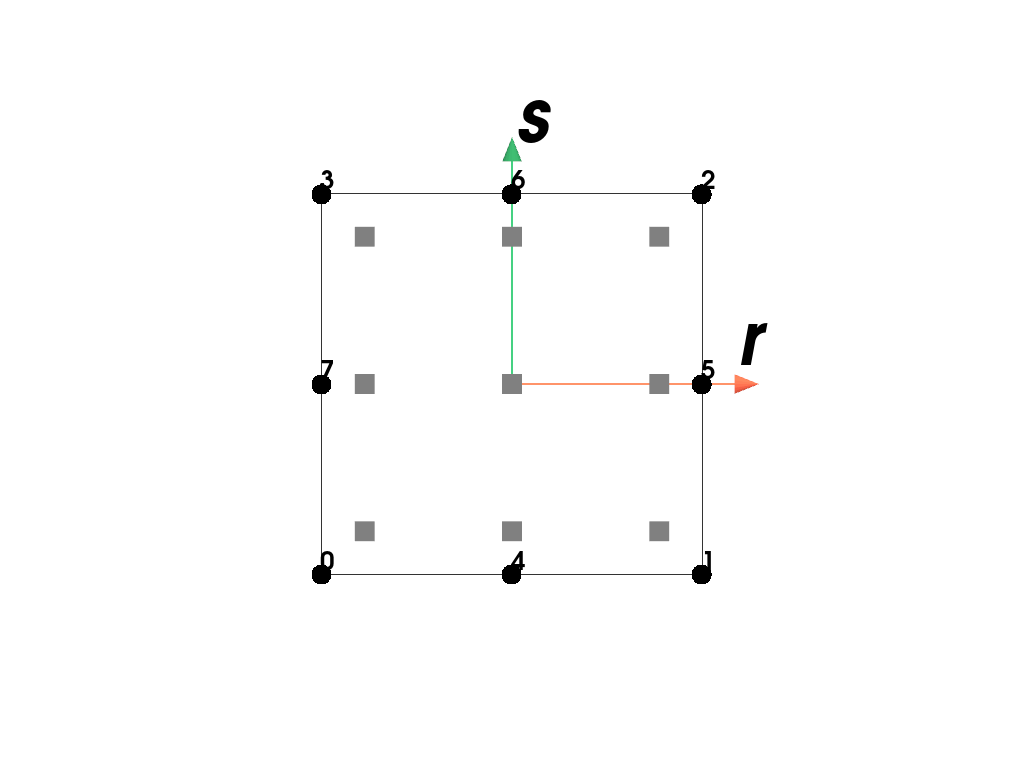
- class felupe.RegionQuadraticQuad(mesh, quadrature=<felupe.quadrature._gauss_legendre.GaussLegendre object>, grad=True, **kwargs)[ソース]#
ベースクラス:
RegionA region with a (serendipity) quadratic quad element.
サンプル
Plot the element with its point-ids and the applied quadrature rule.
>>> import felupe as fem
>>>
>>> mesh = fem.Rectangle().add_midpoints_edges()
>>> region = fem.RegionQuadraticQuad(mesh)
>>> region
<felupe Region object>
  Element formulation: QuadraticQuad
  Quadrature rule: GaussLegendre
  Gradient evaluated: True
  Hessian evaluated: False
>>> region.plot().show()
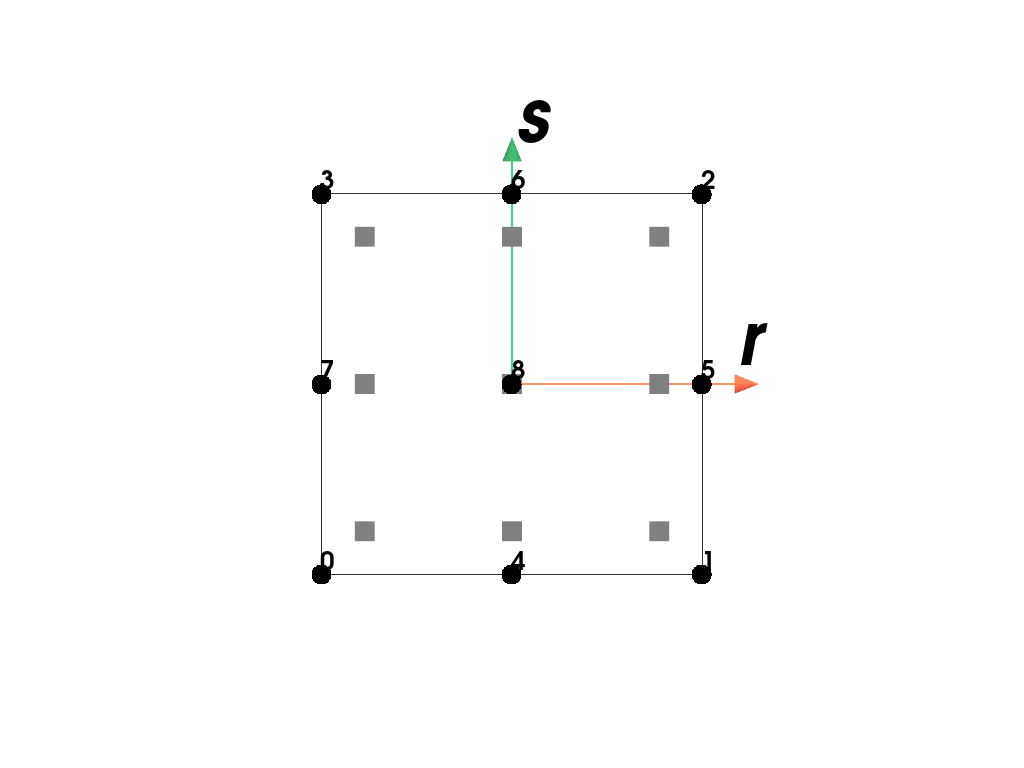
- class felupe.RegionBiQuadraticQuad(mesh, quadrature=<felupe.quadrature._gauss_legendre.GaussLegendre object>, grad=True, **kwargs)[ソース]#
ベースクラス:
RegionA region with a bi-quadratic (Lagrange) quad element.
サンプル
Plot the element with its point-ids and the applied quadrature rule.
>>> import felupe as fem
>>>
>>> rect = fem.Rectangle()
>>> mesh = rect.add_midpoints_edges().add_midpoints_faces()
>>> region = fem.RegionBiQuadraticQuad(mesh)
>>> region
<felupe Region object>
  Element formulation: BiQuadraticQuad
  Quadrature rule: GaussLegendre
  Gradient evaluated: True
  Hessian evaluated: False
>>> region.plot().show()
- class felupe.RegionConstantHexahedron(mesh, quadrature=<felupe.quadrature._gauss_legendre.GaussLegendre object>, grad=False, **kwargs)[ソース]#
ベースクラス:
RegionA region with a constant hexahedron element.
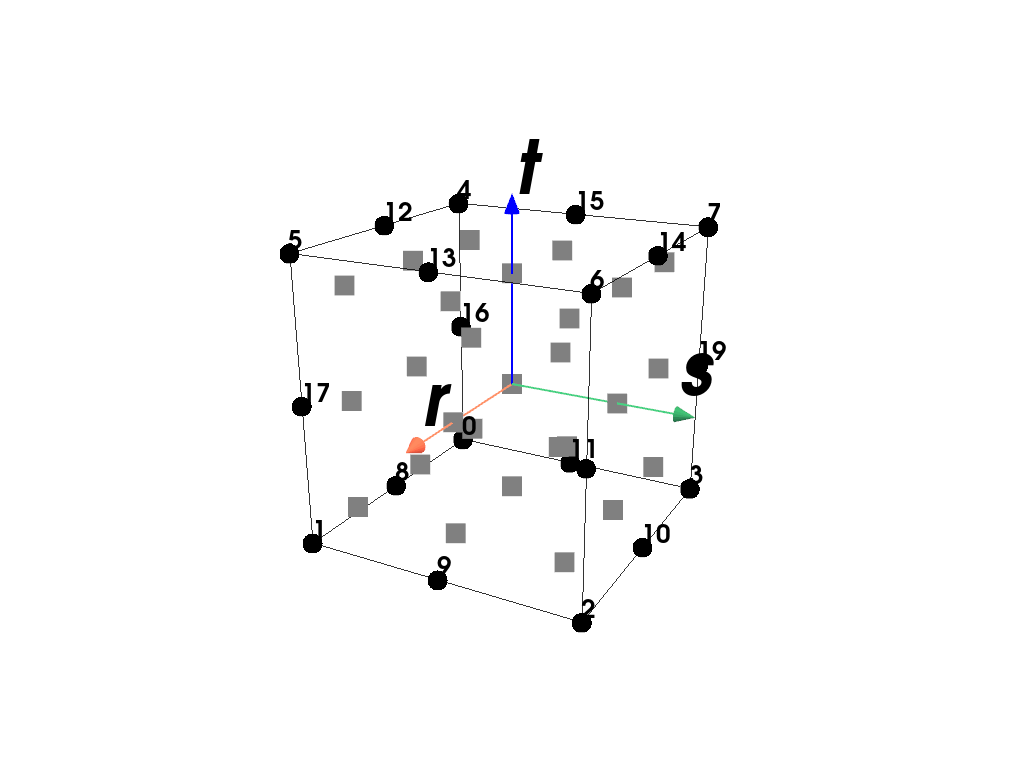
- class felupe.RegionQuadraticHexahedron(mesh, quadrature=<felupe.quadrature._gauss_legendre.GaussLegendre object>, grad=True, **kwargs)[ソース]#
ベースクラス:
RegionA region with a (serendipity) quadratic hexahedron element.
サンプル
Plot the element with its point-ids and the applied quadrature rule.
>>> import felupe as fem
>>>
>>> mesh = fem.Cube().add_midpoints_edges()
>>> region = fem.RegionQuadraticHexahedron(mesh)
>>> region
<felupe Region object>
  Element formulation: QuadraticHexahedron
  Quadrature rule: GaussLegendre
  Gradient evaluated: True
  Hessian evaluated: False
>>> region.plot().show()
- class felupe.RegionTriQuadraticHexahedron(mesh, quadrature=<felupe.quadrature._gauss_legendre.GaussLegendre object>, grad=True, **kwargs)[ソース]#
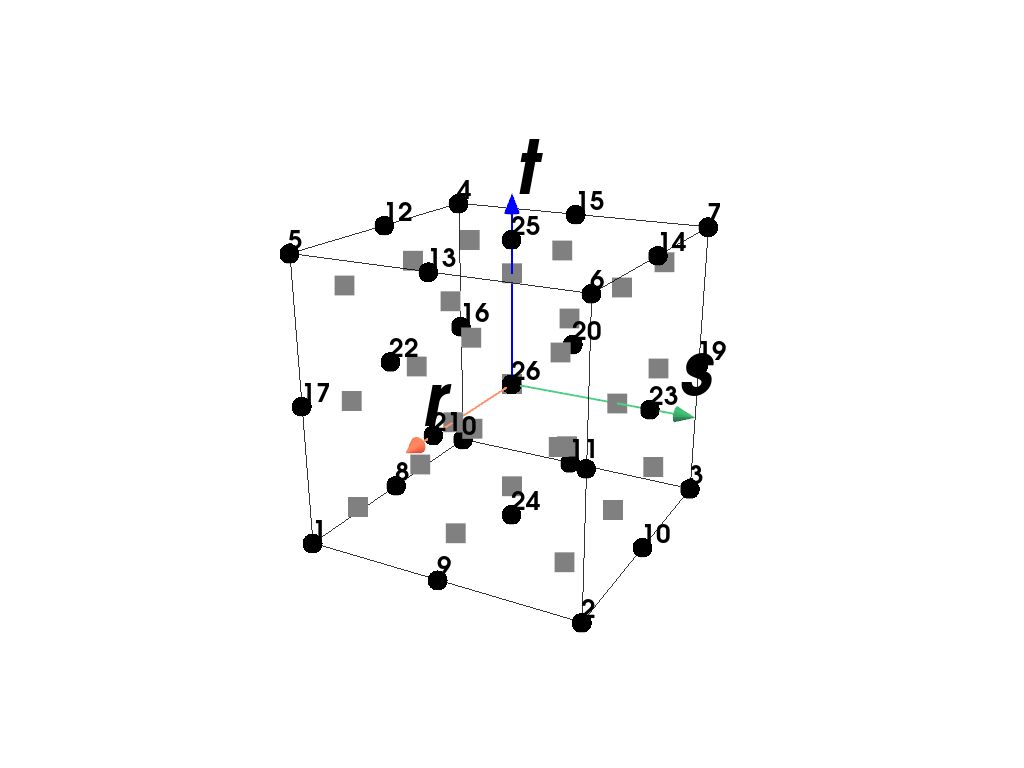
ベースクラス:
RegionA region with a tri-quadratic (Lagrange) hexahedron element.
サンプル
Plot the element with its point-ids and the applied quadrature rule.
>>> import felupe as fem
>>>
>>> cube = fem.Cube().add_midpoints_edges()
>>> mesh = cube.add_midpoints_faces().add_midpoints_volumes()
>>> region = fem.RegionTriQuadraticHexahedron(mesh)
>>> region
<felupe Region object>
  Element formulation: TriQuadraticHexahedron
  Quadrature rule: GaussLegendre
  Gradient evaluated: True
  Hessian evaluated: False
>>> region.plot().show()
- class felupe.RegionQuadraticTriangle(mesh, quadrature=<felupe.quadrature._triangle.Triangle object>, grad=True, **kwargs)[ソース]#
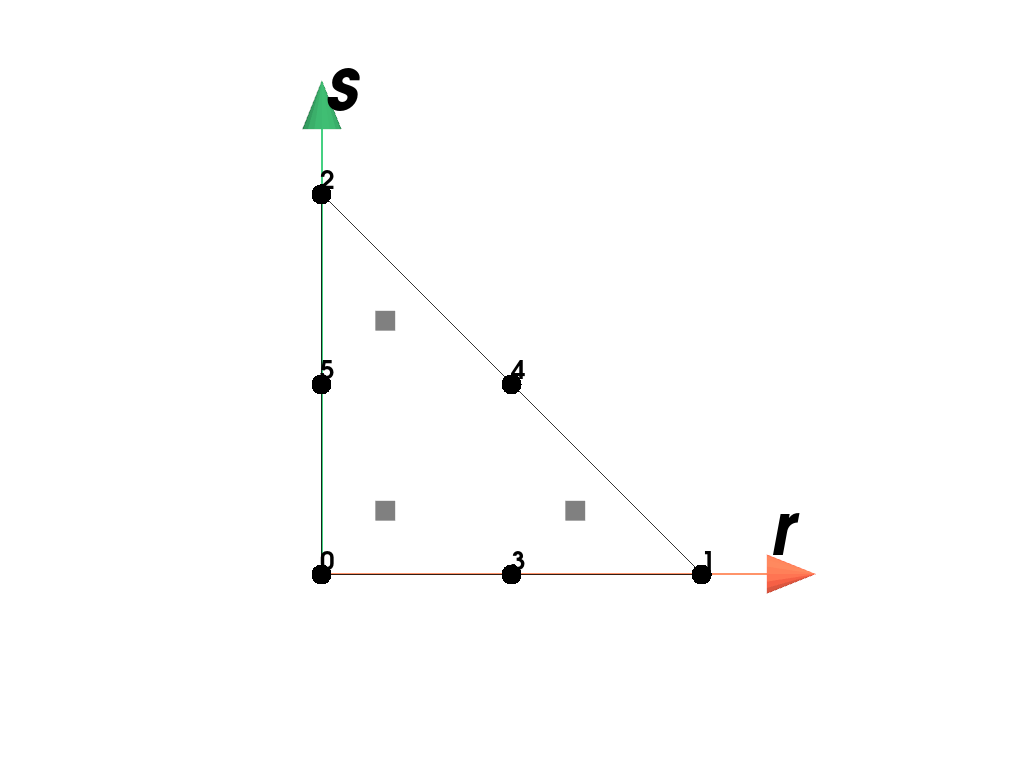
ベースクラス:
RegionA region with a quadratic triangle element.
サンプル
Plot the element with its point-ids and the applied quadrature rule.
>>> import felupe as fem
>>>
>>> mesh = fem.Rectangle().triangulate().add_midpoints_edges()
>>> region = fem.RegionQuadraticTriangle(mesh)
>>> region
<felupe Region object>
  Element formulation: QuadraticTriangle
  Quadrature rule: Triangle
  Gradient evaluated: True
  Hessian evaluated: False
>>> region.plot().show()
- class felupe.RegionQuadraticTetra(mesh, quadrature=<felupe.quadrature._tetra.Tetrahedron object>, grad=True, **kwargs)[ソース]#
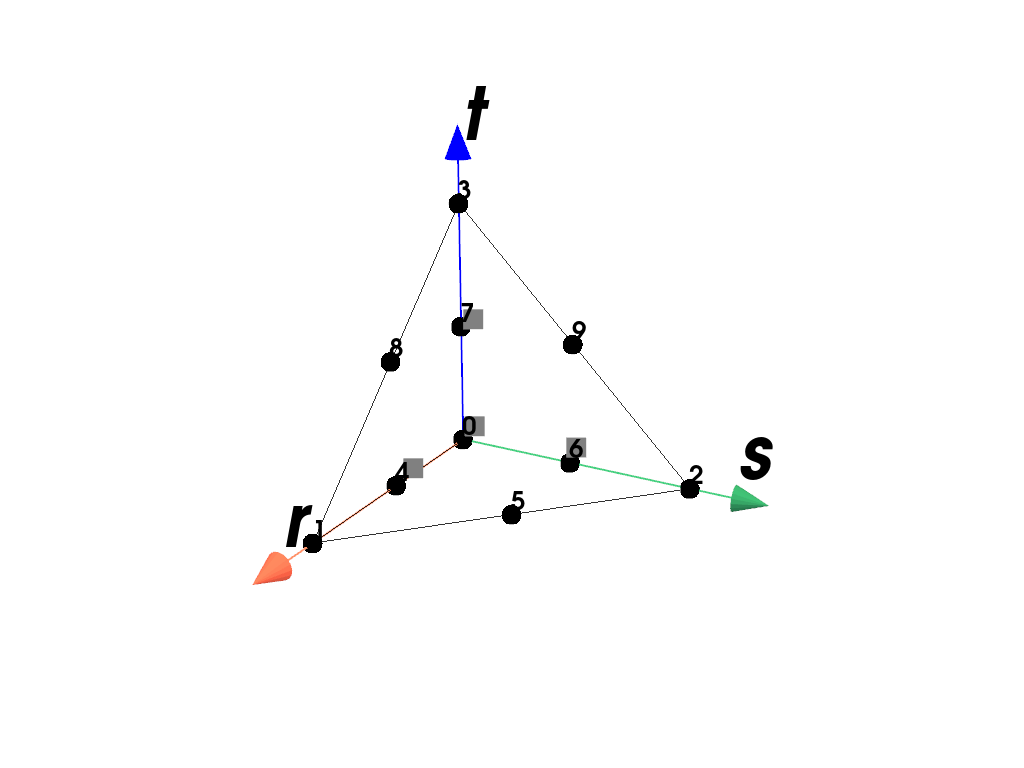
ベースクラス:
RegionA region with a quadratic tetra element.
サンプル
Plot the element with its point-ids and the applied quadrature rule.
>>> import felupe as fem
>>>
>>> mesh = fem.Cube().triangulate().add_midpoints_edges()
>>> region = fem.RegionQuadraticTetra(mesh)
>>> region
<felupe Region object>
  Element formulation: QuadraticTetra
  Quadrature rule: Tetrahedron
  Gradient evaluated: True
  Hessian evaluated: False
>>> region.plot().show()
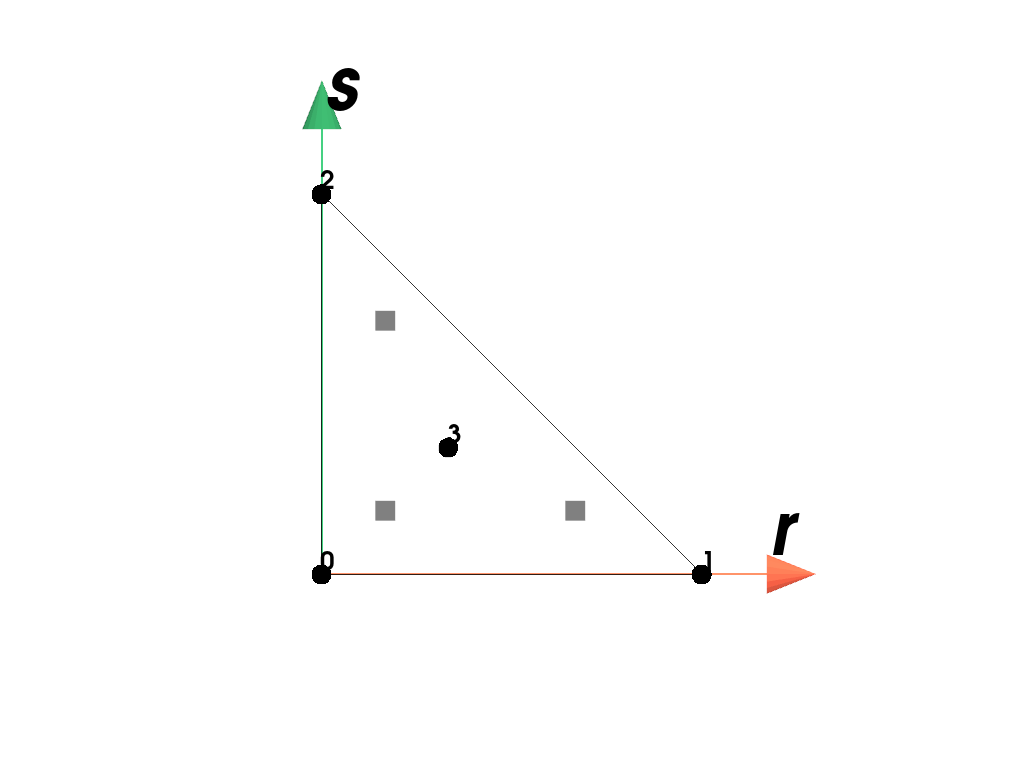
- class felupe.RegionTriangleMINI(mesh, quadrature=<felupe.quadrature._triangle.Triangle object>, grad=True, bubble_multiplier=0.1, **kwargs)[ソース]#
ベースクラス:
RegionA region with a triangle-MINI element.
サンプル
Plot the element with its point-ids and the applied quadrature rule.
>>> import felupe as fem
>>>
>>> mesh = fem.Rectangle().triangulate().add_midpoints_faces()
>>> region = fem.RegionTriangleMINI(mesh)
>>> region
<felupe Region object>
  Element formulation: TriangleMINI
  Quadrature rule: Triangle
  Gradient evaluated: True
  Hessian evaluated: False
>>> region.plot().show()
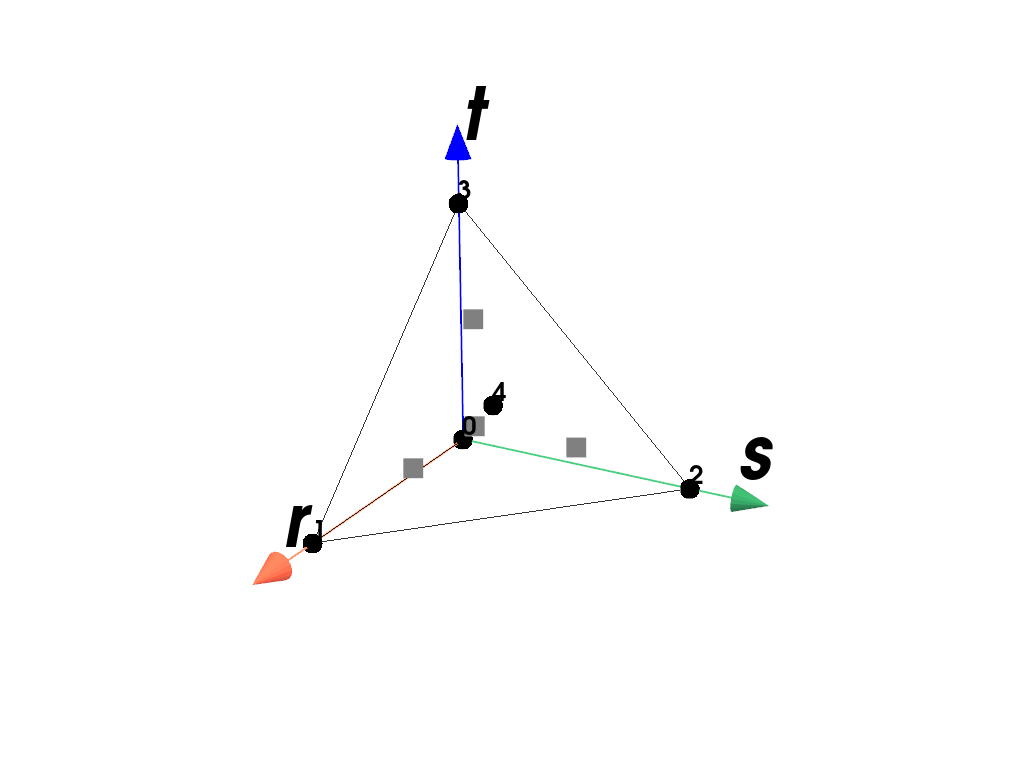
- class felupe.RegionTetraMINI(mesh, quadrature=<felupe.quadrature._tetra.Tetrahedron object>, grad=True, bubble_multiplier=0.1, **kwargs)[ソース]#
ベースクラス:
RegionA region with a tetra-MINI element.
サンプル
Plot the element with its point-ids and the applied quadrature rule.
>>> import felupe as fem
>>>
>>> mesh = fem.Cube().triangulate().add_midpoints_volumes()
>>> region = fem.RegionTetraMINI(mesh)
>>> region
<felupe Region object>
  Element formulation: TetraMINI
  Quadrature rule: Tetrahedron
  Gradient evaluated: True
  Hessian evaluated: False
>>> region.plot().show()
- class felupe.RegionLagrange(mesh, order, dim, quadrature=None, grad=True, permute=True, **kwargs)[ソース]#
ベースクラス:
RegionA region with an arbitrary order Lagrange element.
サンプル
Plot the element with its point-ids and the applied quadrature rule.
>>> import felupe as fem
>>>
>>> mesh = fem.mesh.CubeArbitraryOrderHexahedron(order=3)
>>> region = fem.RegionLagrange(mesh, order=3, dim=3)
>>> region
<felupe Region object>
  Element formulation: ArbitraryOrderLagrange
  Quadrature rule: GaussLegendre
  Gradient evaluated: True
  Hessian evaluated: False
>>> region.plot().show()